Start with the change#
Read the diff against the task you requested. Then inspect the named checks, their output and anything that was not verified. The agent’s summary is useful context; the diff and output are what you inspect.
Check which code was inspected#
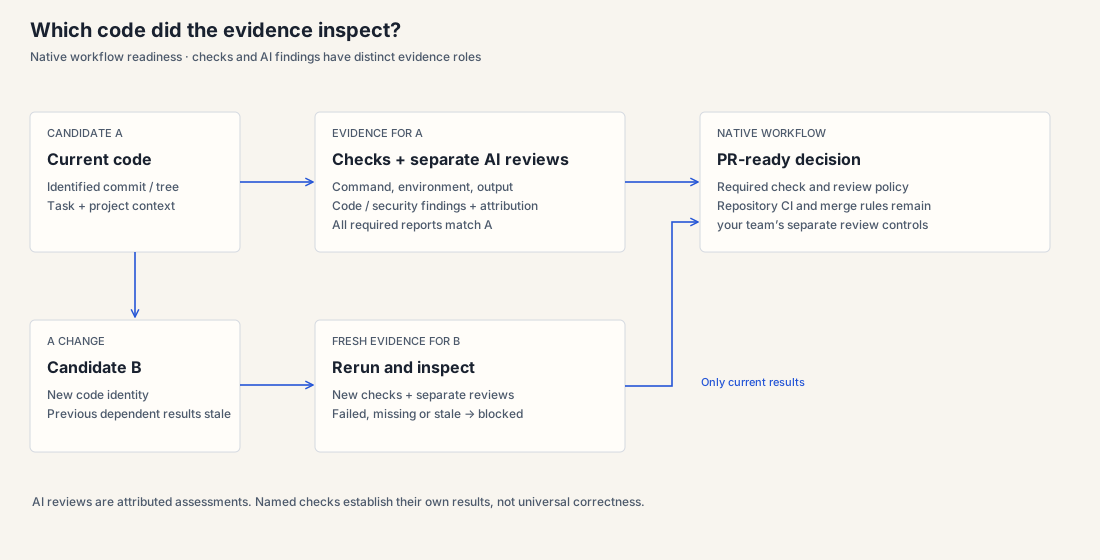
In the native workflow, required checks and review reports bind to the candidate. Compare their candidate reference with the PR head you are reviewing. Changing the code invalidates dependent earlier evidence.
Read the separate AI reviews#
Code and security reviews start automatically once the required and chosen checks pass on the current candidate. They run in separate read-only sessions. Inspect their findings, rationale, scope and reviewer/model attribution.
A finding blocks only when the change introduced it; an older problem outside the changed lines is noted. The owner can send blocking findings back to coding, or accept one with a reason, which the draft PR then lists. A passing review is an AI assessment; it does not replace tests or your team’s judgment.
Read the result#
| Result | Meaning | Your next step |
|---|---|---|
| Passed | The named command passed in that run. | Check that it covers your change. |
| Regression | A check passed before and fails now. | Inspect the failure and ask for a fix. |
| Already failing | The check failed before the change too. | Decide whether this task should address it. |
| No baseline | There is no earlier result for comparison. | Read the current output without assuming an earlier pass. |
| Not verified / not run | The required observation is missing. | Read the reason and request the missing check if needed. |
When a previously passing check regresses, the runtime gives the agent at most one extra attempt. Any remaining failure stays visible.
Know which checks you are looking at#
- Workflow readiness
- Required checks and both review reports must apply to the current candidate before AgentX opens the draft PR.
- Existing direct-task verification
- The runtime reruns usable checks and compares before/after where possible. Failed or missing evidence can be described on a draft PR.
- Repository CI
- Your normal GitHub checks and branch rules govern the repository.
- Benchmark grader
- A historical grader determines a selected benchmark task’s outcome, not readiness of a current workflow task.
Inspect the actual command, environment and candidate attached to each result. These layers have different purposes.
Review a draft PR#
A workflow’s draft PR contains exactly the code whose checks and reviews passed. Its description lists what the plan set out to do, the checks and reviews, any findings the owner accepted with their reasons, and a link to the task page. Your team then reviews the draft PR and repository CI. You decide what gets merged.
Using the existing direct-task path?
That path can produce draft PRs describing failed or unverified checks. Older publication behavior may refuse a new PR on readiness failure; append/sync of an existing PR also refuses failed readiness. Configured CodeBuild output adds evidence rather than automatically enforcing every merge rule.
Inspect a real example#
A saved Django task shows the actual patch and test output behind one benchmark result.
Read the recorded task →Review checklist#
- Does the change meet the request and preserve its constraints?
- Which checks actually ran, on which code, in which environment?
- What failed, regressed or could not be verified?
- Do task evidence and repository CI cover the PR you are reviewing?
- What additional check or human review do you need?
If an important integration could not be tested, keep that gap visible and request the check before merging.