Published installer available. Native workflow diagrams are a preview; check your installed release’s capabilities.
How it works
One task. The whole picture.
Agree on the plan. Inspect the code and evidence. Decide how to respond to review. Follow the whole task without losing its context.
01 / Task journey
An agreed plan. Reviewable work.
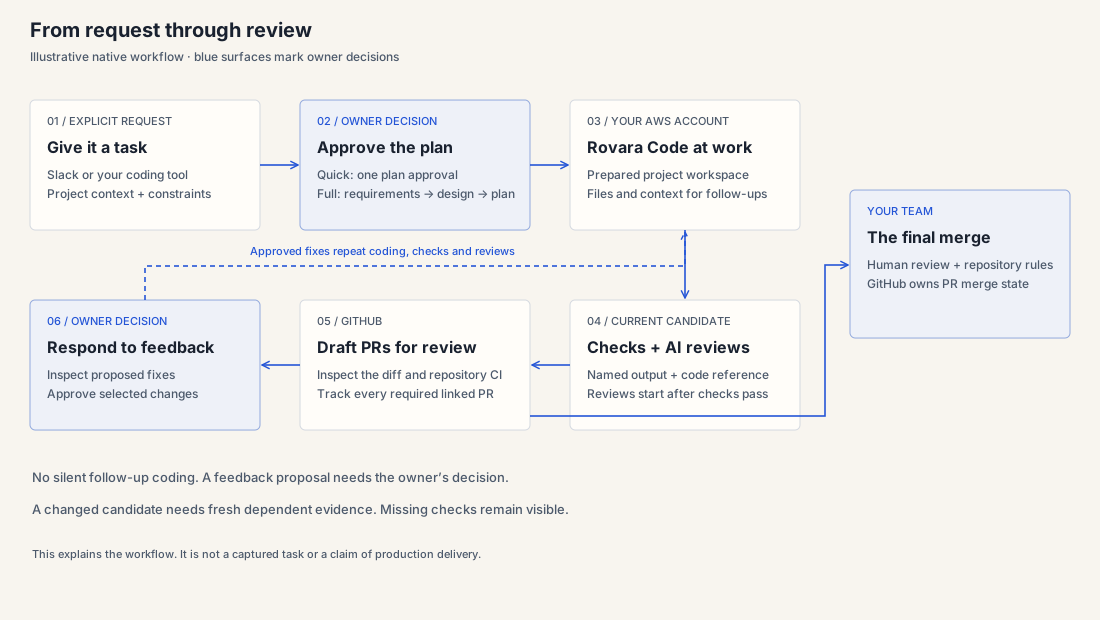
The native workflow starts with your explicit request and keeps plan approval, evidence and PR feedback connected to that task.
Before coding
Read the plan in Slack Canvas or your coding tool. Approve that version or request changes. Required project checks stay on.
Before PR creation
After the selected checks pass, separate code and security reviews start automatically. Native workflow readiness requires matching results; missing or stale evidence stays visible.
During team review
Comments become proposed fixes. The owner decides which changes to authorize. Original comments and merge state stay in GitHub.
02 / Code and evidence
The results belong to the code.
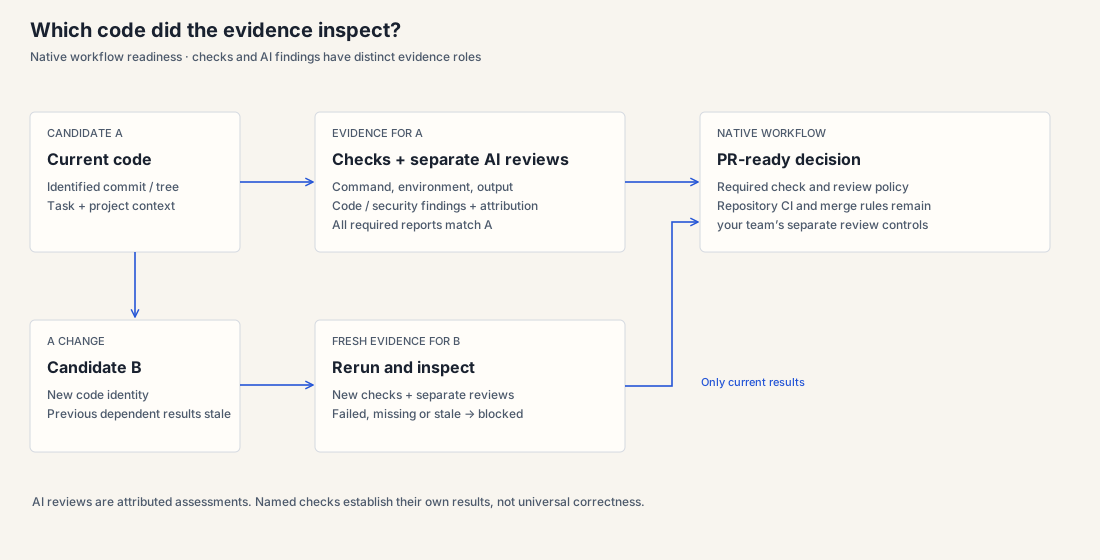
Inspect named check output and separately attributed AI reviews. If the candidate changes, results for the earlier code do not establish readiness for the new code.
Tests and checks
Inspect the command, environment, output and candidate reference. Missing output is a gap, not a passing result.
Separate AI reviews
Code and security reviewers operate in read-only sessions. Their findings are attributed to the reviewer and model.
Your repository’s CI
GitHub CI and branch rules remain authoritative for your repository. Native workflow readiness and repository merge rules are distinct.
Existing direct tasks and historical benchmarks
The existing direct-task path can return draft PRs with failed or unverified checks described. Its publication behavior differs from native workflow readiness. Historical benchmark graders are another evidence layer; they do not qualify a current workflow candidate.
Understand the evidence layers →03 / Workspace and task lifecycle
Come back with the context intact.
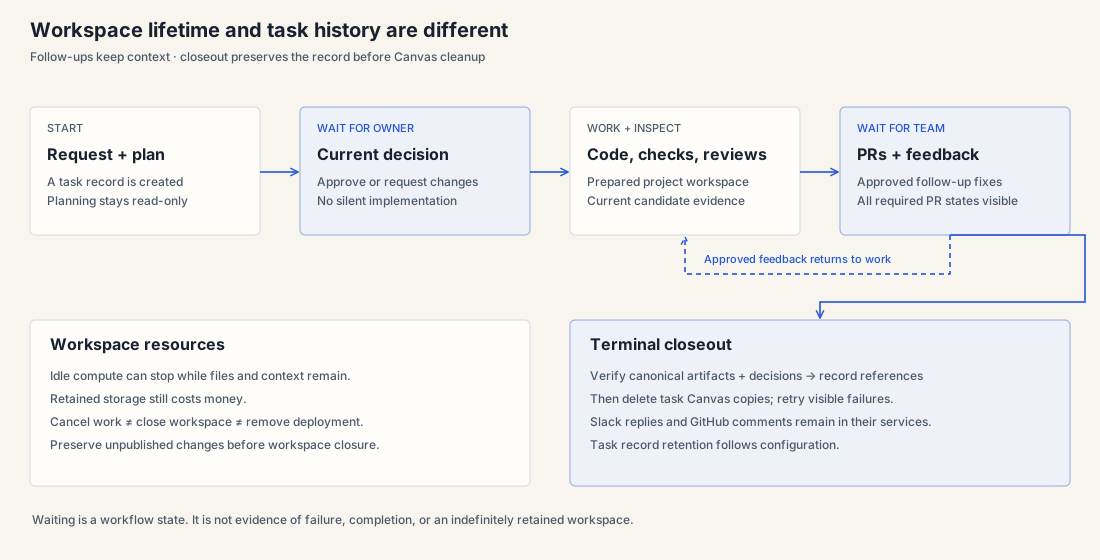
Waiting for a decision is not a failed task. Continuing work is not starting over. Workspace lifetime and the retained task record are separate concerns.
Wait and continue
Inspect the next responsible action. Idle compute can stop while files remain; retained storage still costs money.
Preserve the record
The task record retains artifact references, decisions and evidence according to configuration. It is not an indefinite-retention promise.
Close deliberately
Cancel work, close a workspace and remove a deployment are different actions. Preserve unpublished changes before closure.
04 / Architecture
Know what runs where.
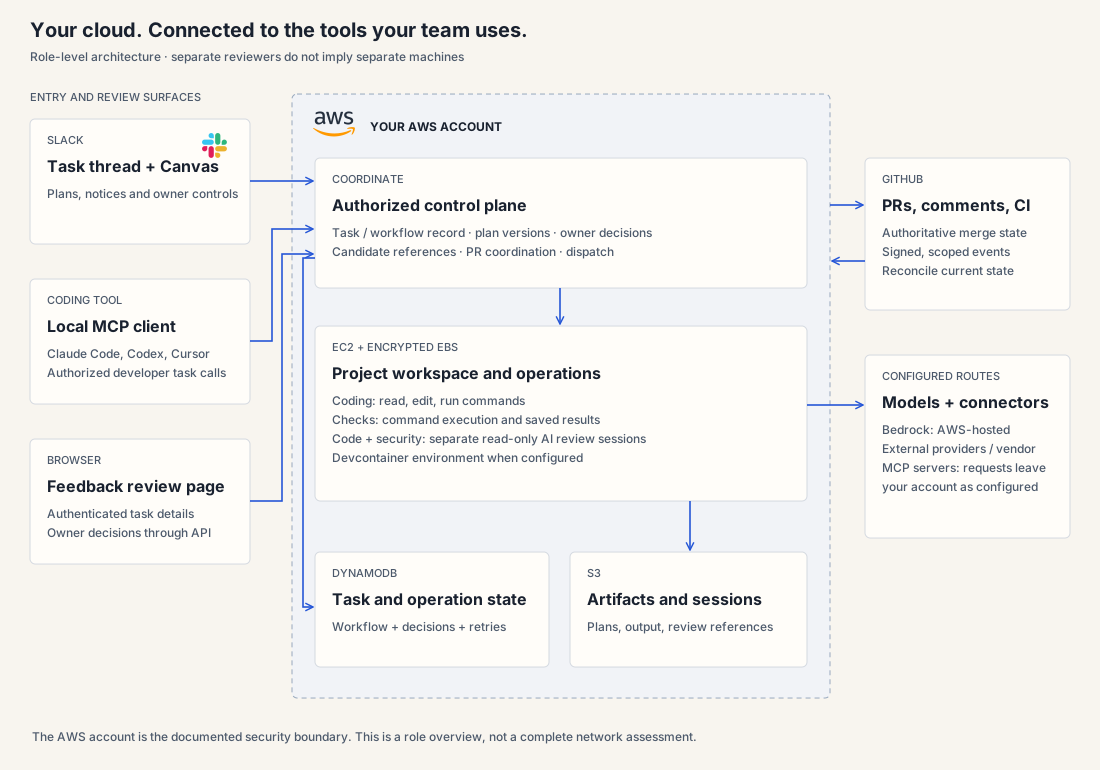
Slack and coding tools are entry points. Rovara Code coordinates the task in your AWS account. GitHub owns PR state; configured providers and connectors have their own data boundaries.
Coordinate
The authorized control plane records tasks, decisions and artifact references. GitHub events are checked against the task’s registered PRs.
Work and inspect
The coding worker uses the configured project environment. Checks execute separately from the coding agent’s success claims; reviewers use separate read-only sessions.
Keep ownership clear
The account is the documented security boundary. External model providers and vendor MCP servers receive their configured requests outside that boundary.
Engineering view: routing, state and authority
- Slack
- Signed ingress → request queue → Fargate orchestrator → control-plane API. Plans use Canvas; concise updates and decisions stay in the task thread.
- Coding tools
- Local
agentx mcp→ authorized developer task API. The coding client is an entry surface; the remote harness implements the task. - Worker operations
- Control-plane dispatch → operation queue → EC2 worker. Coding and read-only review operations have different tool permissions.
- State and files
- DynamoDB stores task/workflow/operation state; S3 holds artifacts and session data; encrypted EBS holds workspace files.
- PR feedback page
- An authenticated browser view reads task-scoped review details and submits owner decisions through the API. A link alone does not grant access.
- GitHub
- Signed events are deduplicated and scoped to linked PRs. GitHub API state remains authoritative; human merge decisions remain in the repository.
Environments in one AWS account are not independent security boundaries. This role diagram is not a complete network or security assessment.
The final decision
You decide what gets merged.
Your team reviews the candidate, task evidence and repository CI with its existing merge controls.
Follow a first task →